Quick answerOpen USGS topoView at ngmdb.usgs.gov/topoview, search for a place, open a map in the list and click GeoPDF, GeoTIFF, KMZ or JPEG. Every map is free and no account is needed. In our test, three U.S. landmarks returned between 27 and 43 maps each, and the oldest was printed in 1886.
What we testedWe searched the Golden Gate Bridge (California), the U.S. Capitol (Washington, D.C.) and Hoover Dam (Nevada/Arizona) in topoView on October 24, 2026. For each place we recorded the number of maps, the oldest map, the scales, the US Topo years and the download formats. Our method is explained on the How We Test page.
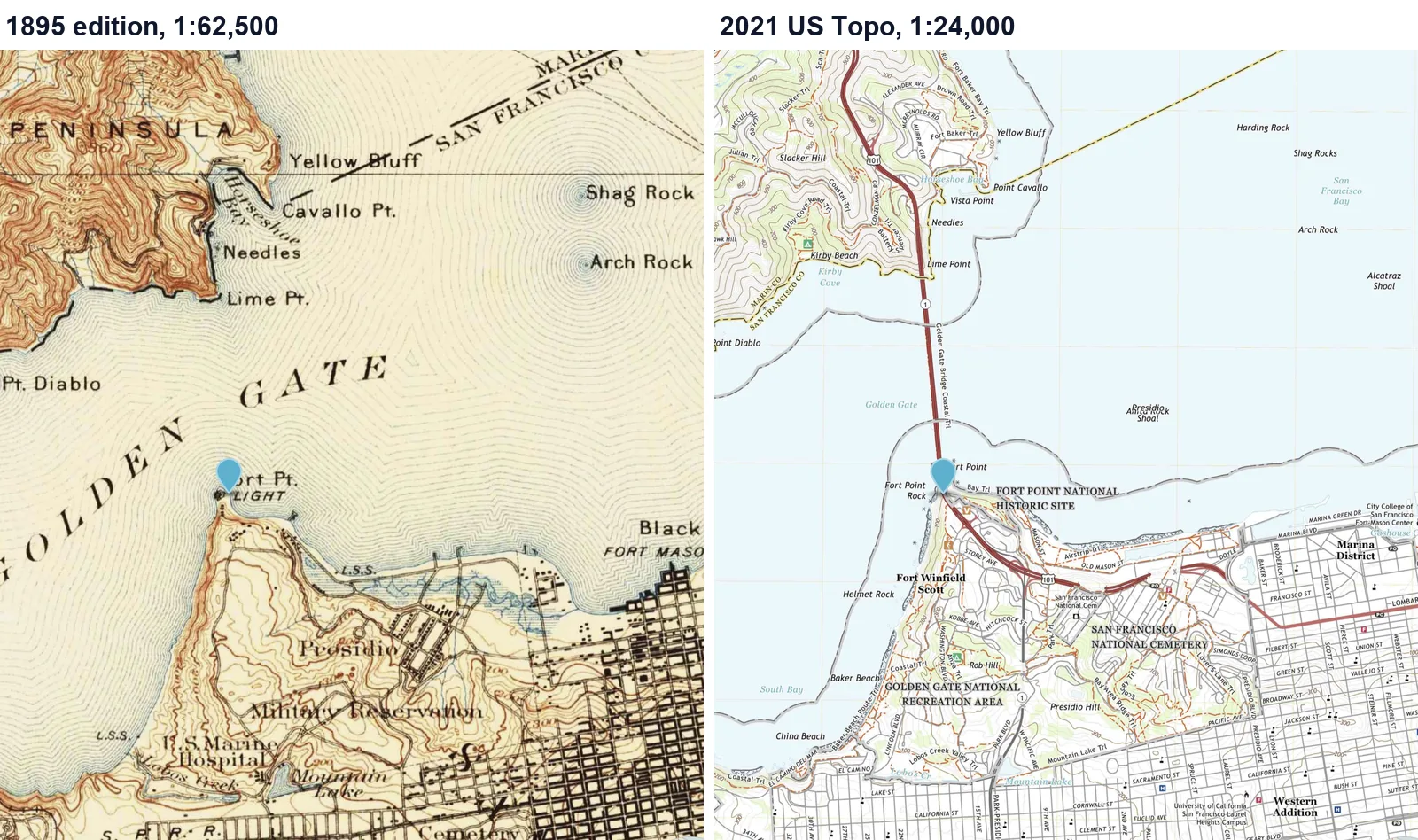
What topoView gives you
topoView is the U.S. Geological Survey’s free viewer for its topographic maps. It covers two collections:
- Historical Topographic Map Collection (HTMC): scans of USGS topographic maps that were originally printed on paper between 1884 and 2006, at scales of 1:250,000 and larger. Reprints and revised editions are included, so one map can appear several times.
- US Topo: the current series, published from 2009 onward and produced from GIS data. According to the USGS, US Topo maps are updated on a three-year cycle, with about one third of the country refreshed each year, and older US Topo editions stay available.
When we opened topoView, the counter at the bottom of the map showed 444,732 map records in total. Downloads are offered in GeoPDF, GeoTIFF, JPEG and KMZ formats at no cost.
How to download a USGS topo map in topoView
- Search for a place. Open topoView and type a place in the Search by location box. Include the city and state, then press Enter. A list of matching places appears below the box; click the one you want. You can also simply click anywhere on the map.
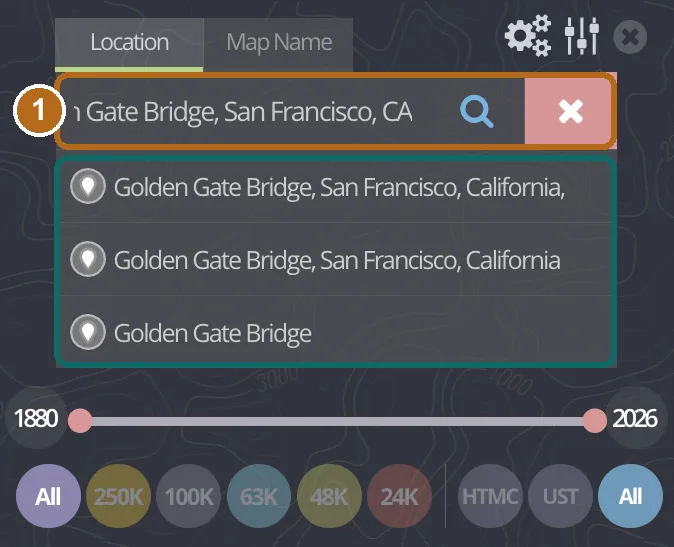
Typing “Golden Gate Bridge, San Francisco, CA” and pressing Enter showed three suggestions. We used the first one. - Read the map list. The panel on the right shows how many maps cover that point (43 for our Golden Gate search), the active filters and the elevation of the point. Each row shows the map name, the date on the map, whether it is an HTMC or US Topo map, the edition year and the scale. Click a row to open its download buttons and a thumbnail.
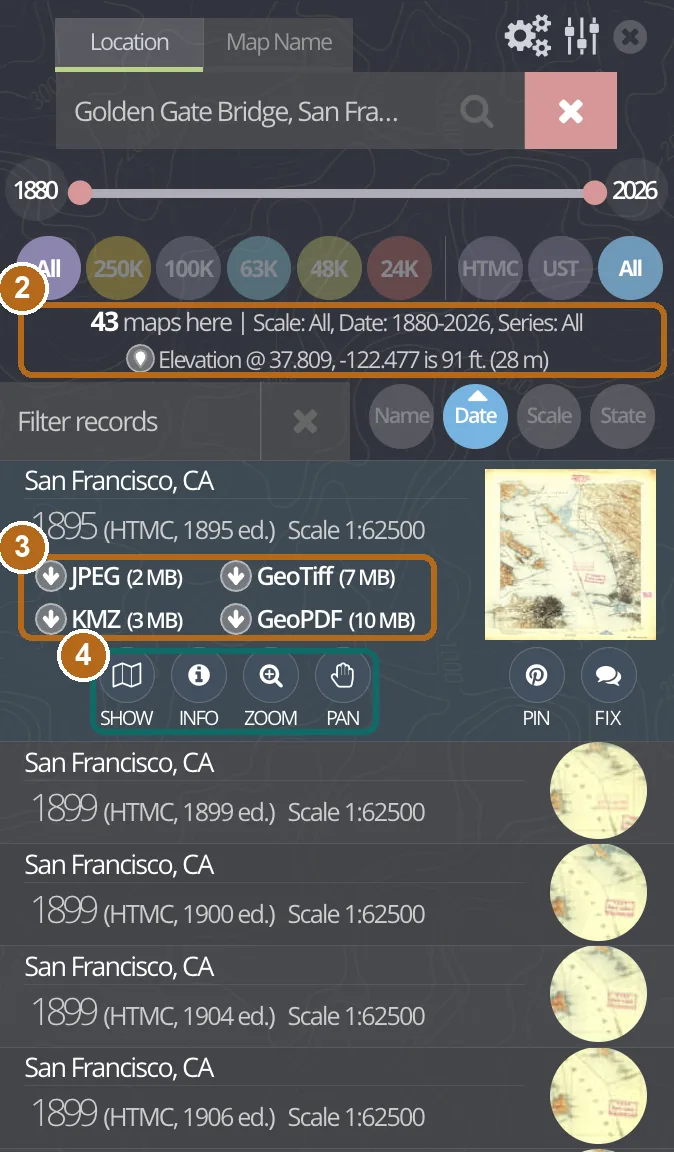
(2) Map count and filters. (3) Download buttons with file sizes. (4) Show, Info, Zoom and Pan tools for the selected map. - Sort and filter. The list starts with the oldest map. Click Date to put the newest maps first. Use the HTMC and UST buttons to show only historical maps or only US Topo maps, the round scale buttons (250K to 24K) to limit the scale, and the timeline slider to limit the years.
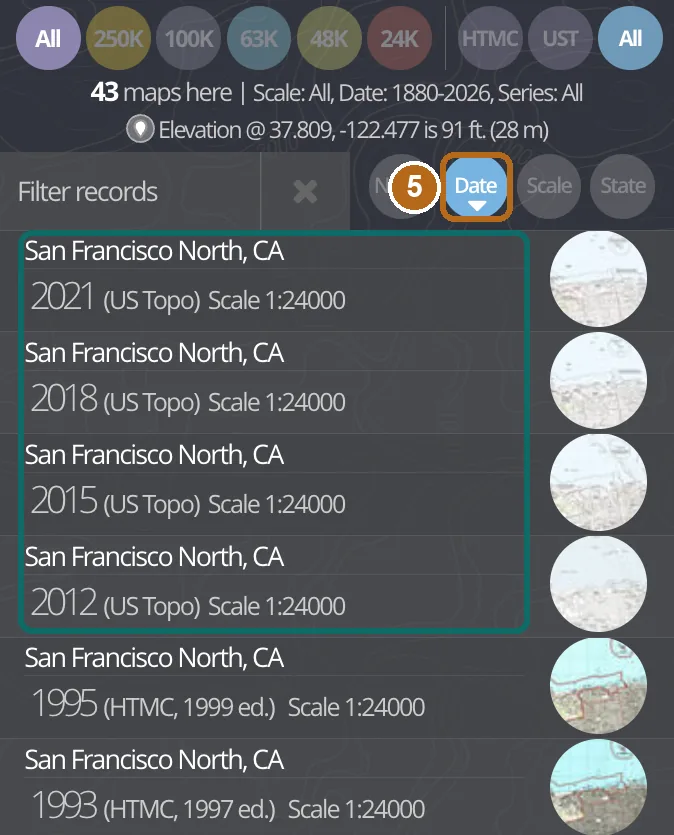
(5) After clicking Date, the four US Topo maps for this point moved to the top. - Preview the map before you download it. Click Show to lay the old map over the modern base map, then drag the Map transparency slider to compare them. Click Hide to remove it. This is the quickest way to check that a sheet actually covers the area you care about.
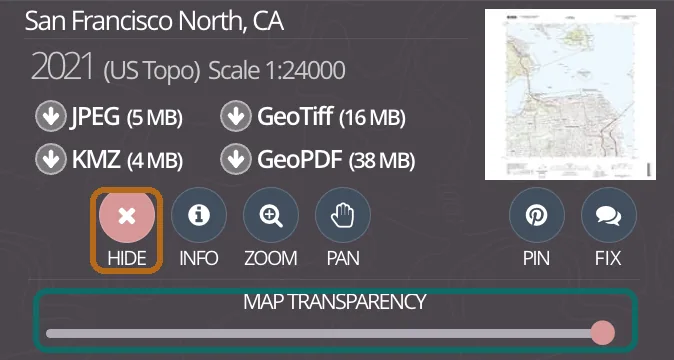
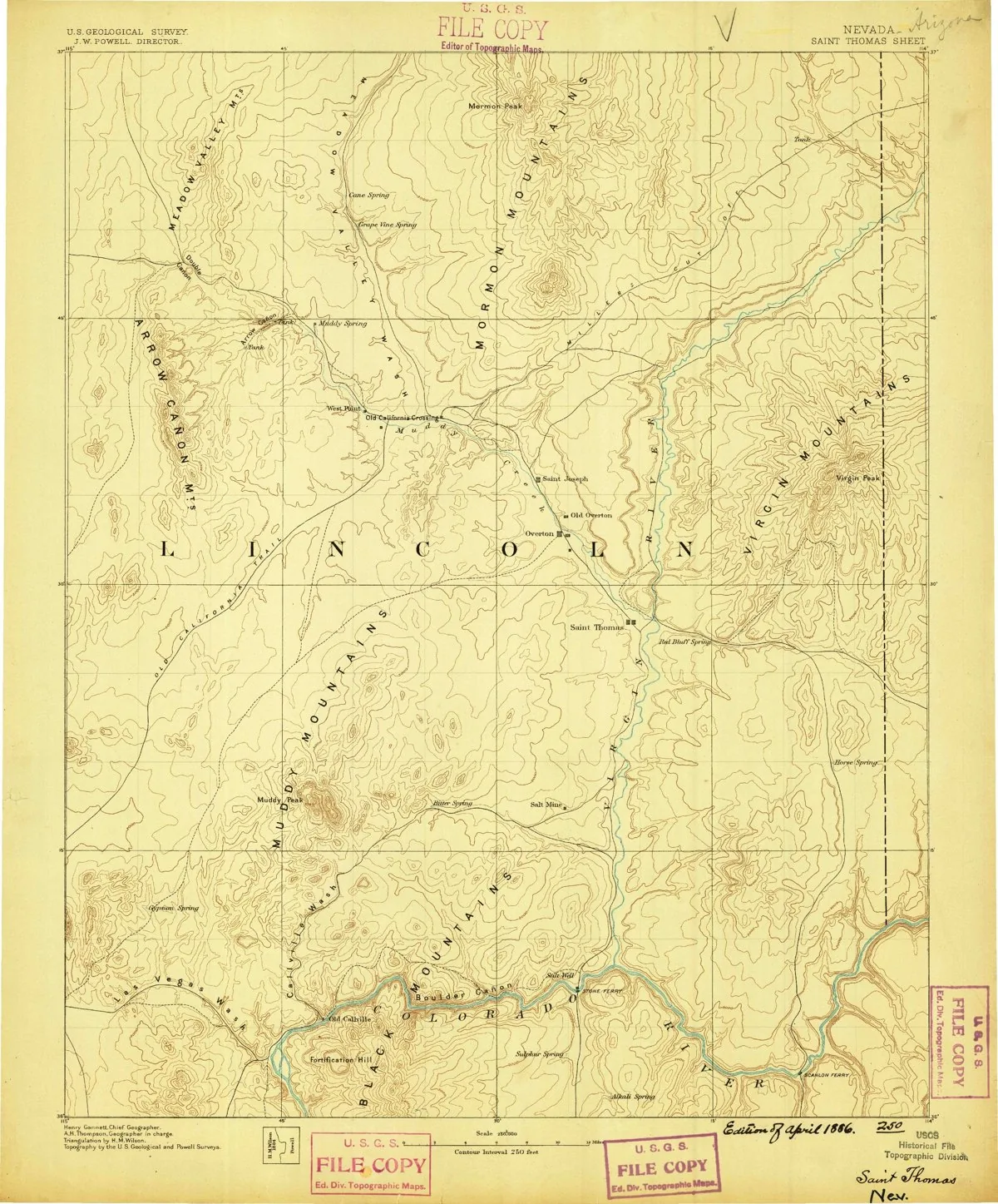
Once a map is shown, the button changes to Hide and a transparency slider appears. - Download. Click the format you need. In our test the JPEG option downloaded as a ZIP file that contained a single JPEG image. For the 1886 Saint Thomas sheet near Hoover Dam, the ZIP was about 1.6 MB and the image inside was 2,459 by 2,965 pixels.
Which file format should you choose?
| Format | Best for | File size in our test |
|---|---|---|
| JPEG | Looking at the map, reading place names, printing a quick copy. No location data inside. | 2 MB (1895 sheet), 5 MB (2021 US Topo) |
| KMZ | Opening the map as an overlay in Google Earth. | 3 MB / 4 MB |
| GeoTIFF | GIS software such as QGIS. The USGS says these are 300 dpi images with georeferencing in the file and are generated at true scale. | 7 MB / 16 MB |
| GeoPDF | Viewing and printing in a PDF reader, with basic tools for coordinates and measuring. | 10 MB / 38 MB |
Format descriptions are summarized from the topoView help guide. Sizes are the values topoView displayed for the 1895 San Francisco sheet and the 2021 San Francisco North US Topo.
Results: what we found at three landmarks
| Place (search used) | Maps | Historical / US Topo | Oldest map | US Topo years |
|---|---|---|---|---|
| Golden Gate Bridge, CA (place suggestion, ZIP 94129) | 43 | 39 / 4 | San Francisco, 1895, 1:62,500 | 2012, 2015, 2018, 2021 |
| U.S. Capitol, DC (address on 1st St SE, ZIP 20515) | 37 | 32 / 5 | Mt Vernon, 1890, 1:125,000 | 2011, 2014, 2016, 2019, 2023 |
| Hoover Dam, NV/AZ (place suggestion) | 27 | 23 / 4 | Saint Thomas, 1886, 1:250,000 | 2012, 2014, 2018, 2021 |
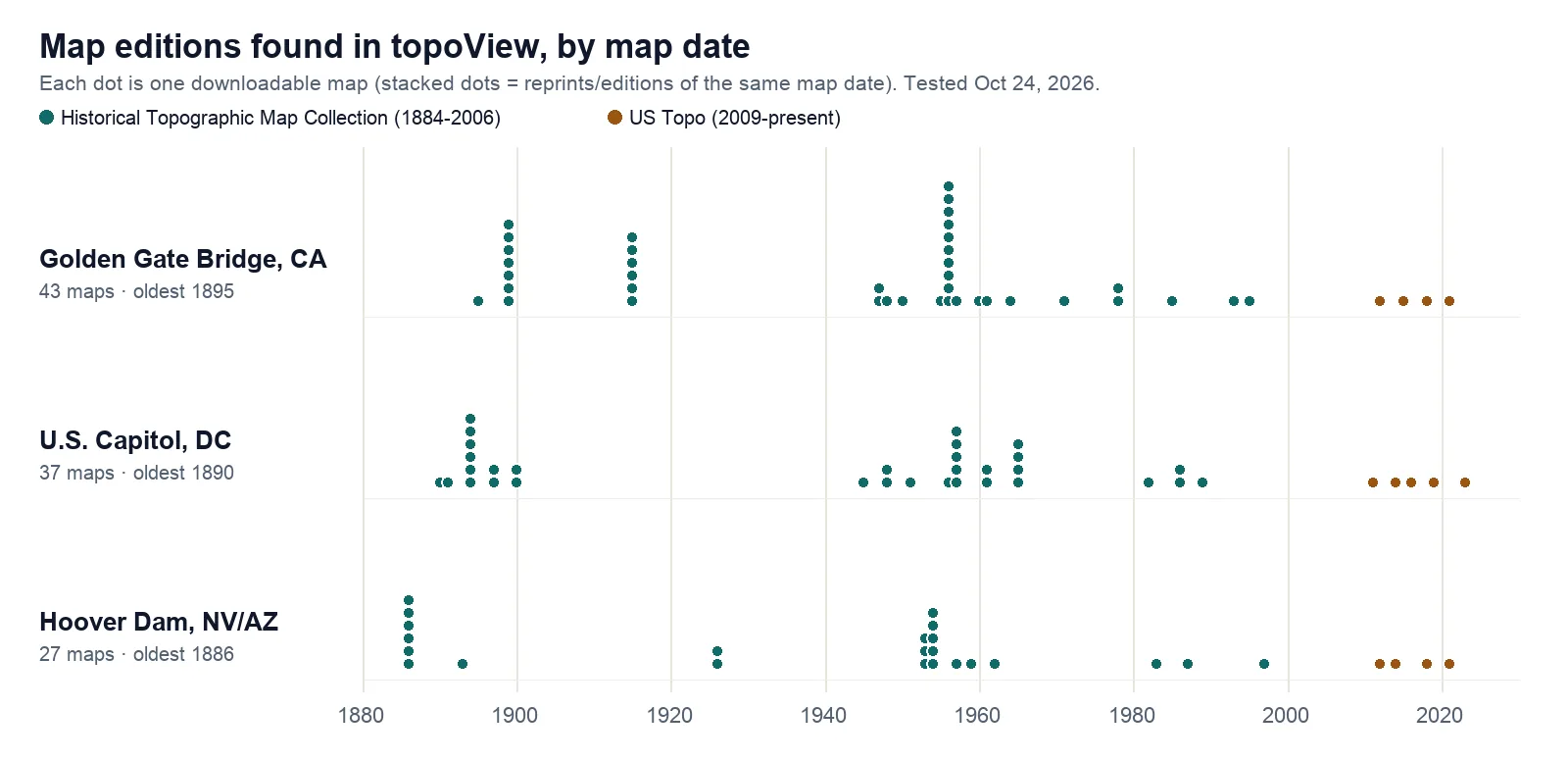
Three patterns stood out:
- The oldest maps are small-scale. All three oldest maps were 1:62,500 or smaller-scale regional sheets. The first detailed 1:24,000 historical map appeared much later: dated 1947 for the Golden Gate (San Francisco North, 1955 edition), 1951 for the Capitol (Washington West) and 1983 for Hoover Dam.
- Many rows are reprints. The 1899 San Francisco map appears seven times, as editions printed from 1899 to 1914. If you only need one copy of each survey, look at the large year (date on map) rather than the edition.
- US Topo years differ by place. The newest US Topo was 2023 for the Capitol but 2021 for the other two points, which fits the USGS’s three-year update cycle.
Problems we ran into, and fixes
- Suggestions only appear after you press Enter, and the first one may be the wrong place. Typing “United States Capitol” and pressing Enter listed “Capitol, Madison, Wisconsin” and “Capitol, Montana” before “United States Capitol”. Check the city and state before you click. Choosing “United States Capitol” returned 37 maps, the same number as our street-address search.
- Coordinates can be read the wrong way. When we typed
38.8899, -77.0091, topoView offered three interpretations. The first one returned 0 maps; the one labelled Y:38.889900 X:-77.009100 (latitude as Y, longitude as X) returned 37 maps. If you see 0 maps for a U.S. location, try another suggestion.
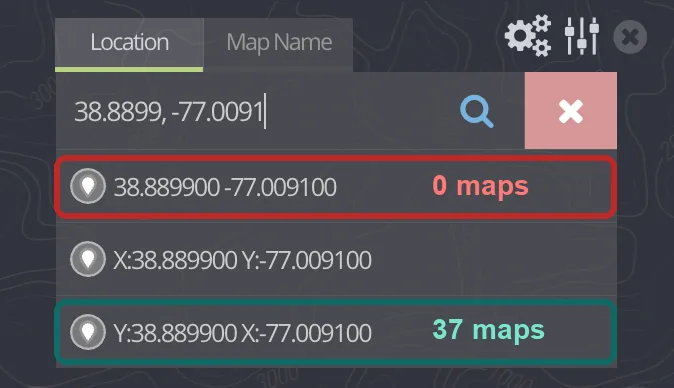
Same coordinates, different results depending on the suggestion you click. - Large files. US Topo GeoPDFs are much bigger than historical scans (38 MB versus 10 MB in our example). Use JPEG if you only want to look.
- Filters stay on. If a search returns fewer maps than expected, check that the timeline covers the full range and that the scale and series buttons are set to All.
Limits to keep in mind
- The USGS states that no single complete set of its historical maps is known to exist, so some editions may be missing from topoView.
- Old maps reflect the surveying methods of their time. Do not use them to settle property lines; that requires a licensed surveyor.
- The elevation figure shown next to the map count is a single-point value calculated by topoView (91 feet for our Golden Gate point; the help guide says these values are referenced to NAVD88 in the conterminous U.S.). It is not read from the old map.
- Counts and years above are what topoView returned on October 24, 2026. The USGS adds and updates maps over time.